Mid-Back Office Chair Guide: Fit, Comfort & Support
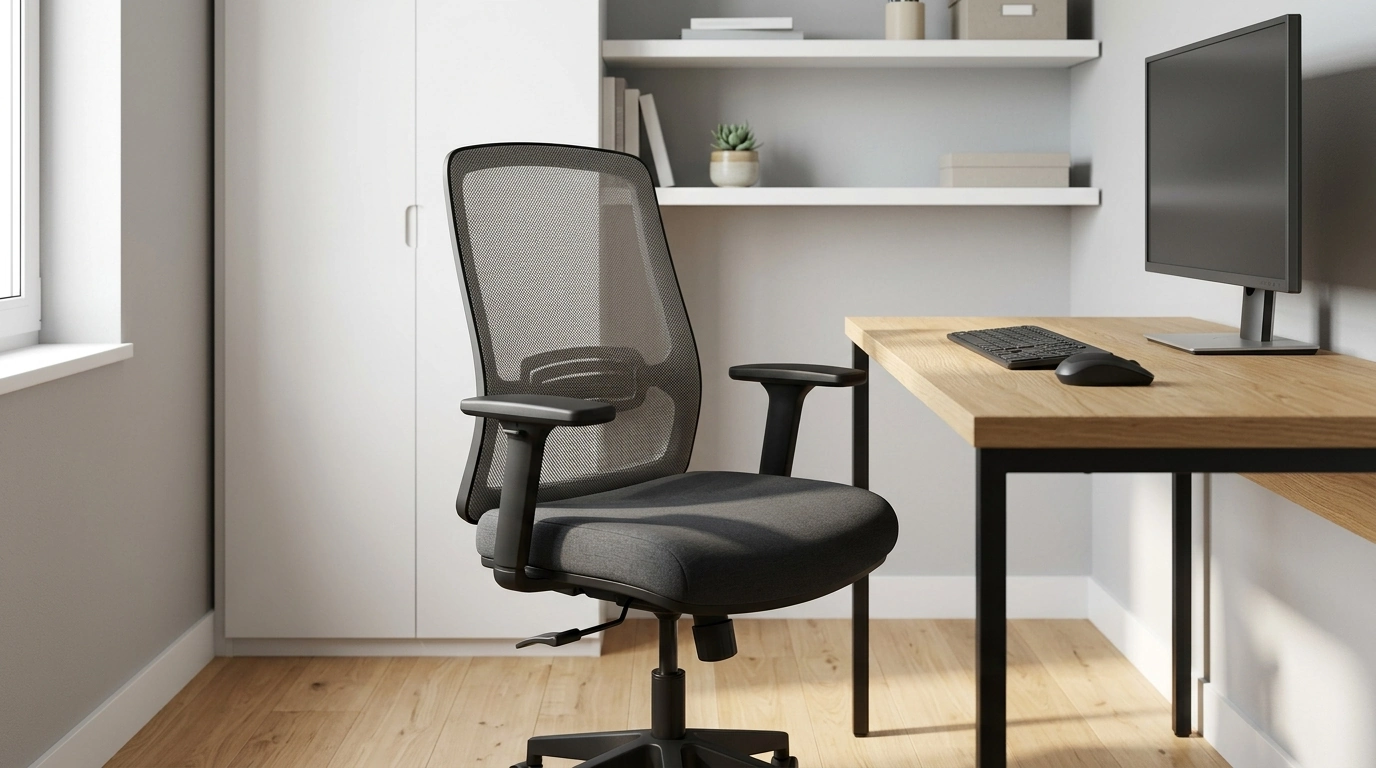
Mid-Back Office Chair: Comfort, Support, and a Cleaner Desk Setup
A mid-back office chair strikes a practical balance: enough support to keep your lower and mid back comfortable, without the tall, heavy look (or feel) of a high-back design. That lighter profile can be a win for home offices, shared work areas, and conference rooms—especially when space is limited or the chair needs to look tidy behind a desk. Below is a clear breakdown of what matters most: support coverage, comfort features, fit, materials, and the small habits that help a chair stay solid over time.
What a Mid-Back Chair Supports (and What It Doesn’t)
Mid-back chairs are built to support the lower to mid portion of your back—often up to around the shoulder blades. That coverage encourages an upright sitting posture while keeping your shoulders freer to move, which helps for typing, mousing, and reaching across a desk without feeling “boxed in.”
The trade-off is that mid-back designs typically offer less upper-back coverage and little to no neck/head support. If you rely on a headrest during breaks, or if you frequently recline for long periods, a high-back chair may feel more natural. For many desk setups, though, the mid-back footprint is a cleaner visual fit, particularly in smaller rooms or minimalist workspaces.
Who Typically Benefits Most
A mid-back office chair tends to work best for:
- Home office users who want ergonomic support without a bulky chair silhouette.
- Shared workspaces and meeting rooms where multiple people rotate through the same seat and need straightforward adjustability.
- People who prefer shoulder mobility and less contact across the upper back.
- Desks with limited clearance—such as under shelves, cabinets, or tight walkways where a taller chair would bump or crowd the space.
Comfort Features That Make a Real Difference
Two chairs can look similar and feel completely different after an hour. These are the comfort details that usually matter most day-to-day:
- Seat cushion density: A supportive cushion helps prevent “bottoming out” after 1–2 hours. Softer isn’t always better; you want steady support, not a sinking feeling.
- Seat shape: A waterfall front edge can reduce pressure behind the knees, which helps with circulation and general comfort during longer sessions.
- Breathability: Mesh backs often reduce heat buildup, while upholstered backs can feel softer and more insulated (which some people prefer in cooler rooms).
- Backrest contour: Gentle lumbar shaping helps maintain a more neutral spine position and can reduce the “slouch and reset” cycle.
Quick comfort checklist
| Feature | Why it matters | What to look for |
|---|---|---|
| Lumbar shaping | Helps reduce slouching and lower-back fatigue | Noticeable support in the curve of the lower back without feeling hard |
| Seat height range | Improves leg angle and foot placement | Feet flat on the floor with knees near 90° |
| Armrests | Reduces shoulder/neck tension when properly set | Arms supported while shoulders stay relaxed |
| Recline/tilt | Allows movement and micro-breaks | Smooth tilt with stable upright position |
| Breathable back | Improves comfort over long sessions | Mesh or ventilated design if overheating is a concern |
Getting the Fit Right: A Simple Setup Method
A good chair can still feel “off” if it isn’t set up for your body and desk. A quick, repeatable method helps you dial in comfort fast:
For broader workstation guidance, the OSHA Computer Workstations eTool is a strong reference for positioning your chair, monitor, and input devices. The NIOSH ergonomics resources also highlight how small fit issues can add up across long workdays.
Materials and Build Details to Pay Attention To
If you want more academic ergonomics background, Cornell’s CUErgo materials offer helpful visuals for posture and workstation layout.
Mid-Back vs. High-Back: When Each Makes Sense
Care, Maintenance, and Longevity Tips
A Solid Option to Consider
If you’re aiming for a comfortable, space-friendly workstation setup, the Mid-Back Office Chair is a straightforward choice to keep your desk area feeling open while still supporting long work sessions.
At-a-glance
| Item | Price | Availability |
|---|---|---|
| Mid-Back Office Chair | $631.04 | In stock |
For a more structured work routine alongside a cleaner setup, these in-stock digital tools can complement a refreshed workspace: Daily Growth Affirmation System Checklist and The Broke Budgeter’s Survival Checklist.
FAQ
Is a mid-back office chair good for long hours?
Yes, as long as it offers supportive lumbar shaping, a comfortable seat cushion, and enough adjustability to keep your posture neutral. If lumbar support feels limited, a small lumbar pillow can help without changing your sitting position too drastically.
What is the main difference between a mid-back and a high-back chair?
A mid-back chair supports the lower to mid back and allows more shoulder movement, while a high-back chair extends higher to cover more of the upper back and sometimes the neck/head. The best choice depends on whether you value mobility and a lighter profile or extra upper-back coverage.
How should a mid-back chair be adjusted for proper posture?
Set seat height so your feet are flat on the floor and your knees are near 90°, then sit fully back so your lower back meets the backrest. If the chair has armrests, adjust them so your elbows rest lightly while your shoulders stay relaxed.










Leave a comment