Android 4K Projector: Auto Focus, Native 1080p Clarity
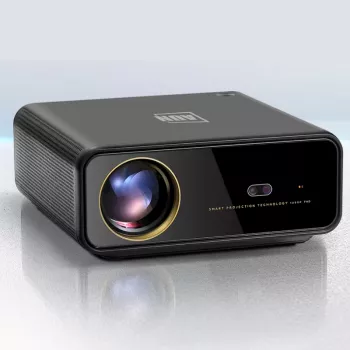
Smart Android 4K Projector with Auto Focus and Full HD 1080P Display
A living-room-ready projector can do more than replace a TV—it can make movie nights, sports, and casual gaming feel bigger without permanently dedicating a wall to a giant screen. The Smart Android 4K Projector with Auto Focus and Full HD 1080P Display is built for quick setup and everyday streaming, pairing an Android-powered interface with auto focus that snaps the picture into clarity in seconds. With a Full HD 1080P native display and 4K input support, it’s a flexible option for bedrooms, apartments, dens, and travel-friendly setups.
What it’s designed to do
- Create a large-screen viewing experience without a TV-sized footprint.
- Reduce setup friction with auto focus so the picture becomes sharp quickly.
- Enable app-based streaming and screen sharing through an Android-powered interface.
- Work for movie nights, casual gaming, presentations, and easy-to-pack travel setups.
If the goal is “set it down, turn it on, and get watching,” features like smart navigation plus automatic focusing matter as much as resolution. They reduce the little hassles that can make a projector feel like a special-occasion device instead of an everyday one.
Smart Android experience
An Android-based interface helps the projector behave more like a standalone entertainment hub. Instead of relying solely on a separate streaming stick or laptop, you can navigate apps and media directly on the projector. App availability and playback capability can vary by service and region, but the core benefit remains the same: fewer devices to juggle for basic streaming.
- Android-style menus for quick access to apps, inputs, and media.
- Built-in settings for picture, sound, and source switching without extra hardware.
- Often pairs nicely with wireless peripherals (where supported) for simpler control.
For platform background and compatibility expectations, Android’s official TV resources are a useful reference point: Android Developers — TV overview.
Image quality: Full HD 1080P with 4K input support
Full HD 1080P remains a sweet spot for big-screen viewing because it keeps text readable and subtitles crisp while still being easier to drive smoothly than higher native resolutions. This projector’s “4K support” typically means it can accept a 4K signal from a source device (like a streaming box, console, or laptop) and scale it to the projector’s native 1080P display.
- Full HD 1080P native display for detailed scenes and clear UI text.
- 4K input compatibility for broader device and content support (scaled for display).
- Best results usually come from a darker room and a neutral wall or projection screen.
- Practical tip: set the source device output to a stable mode that plays smoothly and matches the projector’s strengths.
For sports and live content, consistency matters: a clean signal, stable Wi‑Fi (if streaming), and controlled lighting often improve the experience more than chasing the highest resolution setting.
Auto focus and fast alignment
Auto focus is one of the biggest quality-of-life features in a projector used daily. Move it from a coffee table to a shelf, adjust the distance for a larger image, or pack it for travel—auto focus helps the picture return to clarity without manual trial-and-error.
- Auto focus helps maintain sharpness after repositioning.
- Especially useful for room-to-room use or frequent distance changes.
- If available, fine-tune focus or sharpness after auto focus settles.
- For the cleanest geometry, keep the lens centered to the screen before relying on digital corrections.
When you’re projecting at an angle, digital keystone-like corrections can help square the picture, but heavy correction can soften the image. Starting with a centered placement usually looks the cleanest.
Connectivity and everyday compatibility
Projectors tend to shine when they’re easy to connect to the devices you already use. Plan for the sources you’ll plug in most—streaming devices, laptops, consoles, or media players—and keep cable routing in mind if you’ll mount it or place it on a high shelf.
- Works well with common home sources via supported inputs (such as HDMI for many devices).
- A solid HDMI cable can reduce dropouts and improve reliability for higher-bandwidth signals.
- For larger rooms, external audio can be a worthwhile upgrade if built-in speakers feel limited.
- Power placement and port access matter for tidy installs (especially shelves and ceiling setups).
For HDMI standards and cable guidance, the official source is helpful: HDMI Licensing Administrator (HDMI.org).
Recommended setup for a sharper, brighter picture
Specifications at a glance
| Item | Detail |
|---|---|
| Product | Smart Android 4K Projector with Auto Focus and Full HD 1080P Display |
| Display | Full HD 1080P |
| 4K support | Accepts 4K content (scaled for display) |
| Focus | Auto focus |
| Best for | Streaming, movies, sports, casual gaming, presentations |
| Availability | In stock |
Care, maintenance, and troubleshooting basics
In-stock picks
- Smart Android 4K Projector with Auto Focus and Full HD 1080P Display — a simple, living-room-friendly projector for big-screen streaming and fast focusing.
- The Broke Budgeter’s Survival Checklist (Printable PDF Money Planner) — useful for planning a home entertainment upgrade budget, from cables and mounts to a projection screen.
FAQ
Does a 4K projector always display true 4K detail?
No. Some projectors accept a 4K input signal but display at a lower native resolution (such as 1080P) by scaling the image; it can still look excellent at typical viewing distances, especially with good focus and lighting control.
How does auto focus help in everyday use?
Auto focus quickly adjusts the lens after you move the projector or change the projection distance, so the image snaps back into clarity with less manual fiddling.
What’s the easiest way to improve picture quality at home?
Reduce ambient light, project onto a smooth matte wall or screen, keep the projector as centered as possible, and use a reliable HDMI connection when you can for steadier playback.












Leave a comment